Introduction to the Unblu mobile SDKs
The Unblu mobile SDKs for Android and iOS can be used to integrate Unblu into mobile applications for visitors or agents. When the SDK is integrated into an app, the app can use many of the same features as are available to visitors and agents through the web interfaces (chat, co-browsing, notifications, etc.). However, the available collaboration layers are mobile co-apping, screen sharing, and document collaboration.
Features
The following features of Unblu are available when interacting with the SDKs:
-
Dynamically load and unload the API.
-
Check if a connection to the Unblu server could be established.
-
Check if an agent is available.
-
Start a chat conversation.
-
Start a mobile co-apping conversation.
-
Start a screen sharing session.
-
Join a conversation using a PIN provided by the agent.
-
Start an audio or video call with up to six participants.
-
Search the text of messages in the visitor’s conversations from the Unblu UI.
-
Add or update custom cookies sent to the Unblu server with each request.
-
In-app events for API state, session state, notifications (such as messages when a participant joins the conversation or when a chat message arrives), and errors.
-
Push notifications for unread messages and incoming calls.
-
Whitelist URLs accessible from within the SDK’s WebView.
-
Whitelist of external links that can be opened from the chat.
-
Certificate pinning.
-
Target multiple Unblu endpoints from a single app, for example depending on the user’s authentication status or location.
The following features are available in co-browsing sessions:
-
Co-browse all your app’s content. Note that you can’t co-browse the Unblu UI.
-
View user interactions with the device screen remotely.
-
Display screen orientation changes in the Agent Desk.
-
Add or remove private views, such as password fields, that shouldn’t be displayed to other co-browsing participants.
-
Add or remove private areas which shouldn’t be displayed to other co-browsing participants.
-
Lock the screen displayed in the Agent Desk if the visitor puts the app into the background.
-
Areas of the app can be marked remotely.
-
Chat between visitor and agent with the built-in UI.
-
Start an audio or video call.
| The available collaboration layers are mobile co-apping, screen sharing, and document collaboration. The mobile SDK doesn’t support the embedded co-browsing, universal co-browsing, or whiteboard features. |
Architecture overview
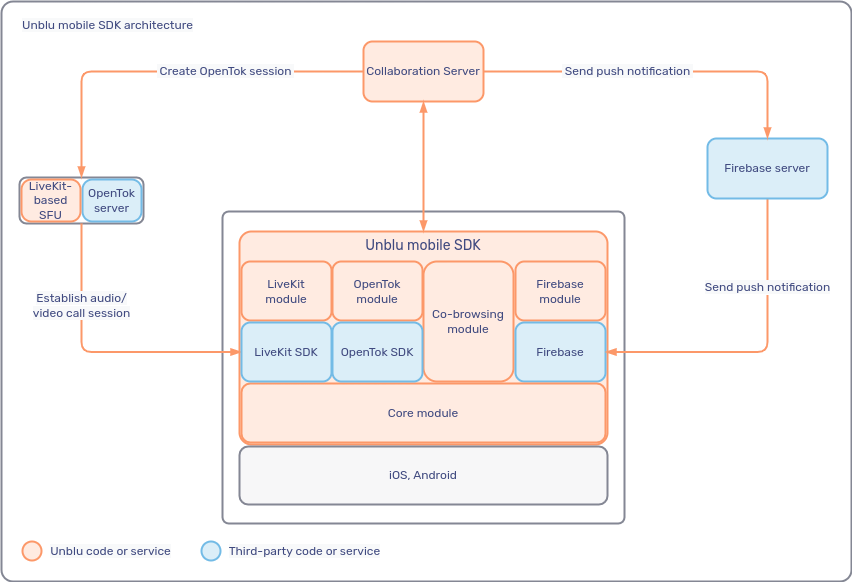
The diagram below shows how the mobile SDKs are integrated into the Unblu environment as well as the LiveKit-based selective forwarding unit (SFU) and the OpenTok and Firebase servers, all three of which are used in the SDKs via their respective libraries.
UI concept
The Unblu UI is a WebView that behaves like any other such element. This allows the UI to be displayed everywhere, and lets you integrate it in other views with ease.
Although the content displayed is flexible, it does require space to render properly. The view element should therefore take up the entire width of the screen. You should also let it fill a large share of the screen’s height.
The content of the view element isn’t loaded from scratch each time the view’s reattached to the view hierarchy. It preserves its state while it isn’t visible or attached to the view hierarchy.
WebViews
Some customers may question the use of a WebView to display the Unblu UI in the mobile SDKs. These questions are often based on outdated information about WebViews and on a cursory understanding of how the Unblu mobile SDKs are built. The points below are intended to address any questions or concerns you may have about the use of WebViews in the mobile SDKs.
-
The Unblu mobile SDKs are components-based.
-
You can display the Unblu view like any other component within your application.
-
The Unblu mobile SDKs provide all APIs needed to trigger actions from any native component. They also let you register listeners to react natively to events.
-
Changes to Unblu data models are added to the APIs provided by the mobile SDKs.
Some components, such as the messenger UI, are based on a
WebViewinternally, and it isn’t possible to recreate the messenger UI using the APIs that the SDKs provide. For other UIs—the visitor inbox, for example—the APIs provide everything you need to display the same information in a native widget. -
-
One major concern is that the
WebViewdoesn’t look and feel like a native component.However, when used correctly,
WebViews no longer feel any different from native components. When it’s visually embedded in the native component, it feels no different from a similar native component. Unblu mobile SDK components that use aWebViewhave the same smooth scrolling, gestures, theming, and accessibility as native components. In fact, often only experts can tell the difference between the messenger UI and the rest of a mobile application. -
On a similar note, some customers worry about the degree of interaction possible with other features of their app.
This fear is unfounded. You can display a lot of information from Unblu, such as the number of unread messages or open and archived conversations, using native widgets within your application. You can also trigger many Unblu-related actions, like starting a conversation of a mobile co-browsing session, from your native widgets.
Conversely, in the messenger UI, where you have no other choice but to use the Unblu widget, you can still interact with the rest of your app. Suppose a message contains a link to some other view in your app—the account transactions, say. In that case, you can register a link handler and intercept the click to open the corresponding section page in your app, or open a modal dialog.
-
WebViews do have some technical limitations when interacting with the operating system. For this reason, critical parts of the Unblu mobile SDKs are native: file preview, mobile co-browsing, and indicators are built natively for performance and reliability. -
The Unblu mobile SDKs follow most OWASP Mobile Application Security best practices.
-
The UI provided by the Unblu mobile SDKs conforms to WCAG 2.2 and complies with the European Accessibility Act out of the box. Most accessibility issues are due to poor configuration decisions and can be rectified by any user with the
ADMINrole in Unblu.Any accessibility issues that are due to bugs in Unblu are considered critical and given a high priority.
-
You can provide dark and light modes by configuring two different sets of color configuration properties with different API key scopes in Unblu and selecting which scope to use based on the mode currently in use.
Mobile SDK size
Determining the impact of the Unblu mobile SDK on an app’s size is more art than exact science. How much the SDK adds to the size of your app depends on the version of the SDK, the dependencies it requires for your use cases, and your app’s build configuration.
The largest components of the SDK are the call modules. For LiveKit, this is livekitmodule/livekitcallmodule, for Vonage, it’s callmodule/opentokcallmodule. These modules include large WebRTC dependencies, which often contain native libraries.
Android
The android:extractNativeLibs attribute of the application declaration and its replacement, the DSL option useLegacyPackaging, affect the final Android Package (APK) size. Both specify whether to package native libraries (SO files) in compressed form, which can halve the size of the APK. If the libraries are compressed, they’re extracted to the filesystem during installation. This results in a larger on-device footprint but a smaller download size.
+ This setting doesn’t affect the size of the Android Application Bundle (AAB), which is the format delivered to the Play Store. Native libraries are always stored in compressed form in AABs, and only the libraries needed for the user’s ABI are delivered.
Example
Adding the Core SDK, Firebase, and LiveKit modules increases an app’s size as follows:
-
APK with
android:extractNativeLibs=true: ~27 MB -
APK with
android:extractNativeLibs=false: ~49 MB -
AAB, independent of
android:extractNativeLibs: ~27 MB
The impact of each module, uncompressed but with code shrinking enabled, is:
-
Core SDK (including co-browsing): ~2.8 MB
-
Document collaboration: ~200 KB
-
Apryse SDK (required for document collaboration): ~53 MB
-
Livekit: ~49 MB
-
Vonage: ~75 MB
-
Firebase: ~4 MB
These values are the increase in size of the application after installation on the device, regardless of the size of the downloaded application.
iOS
The IPA file format used to publish apps to the Apple App Store is compressed. After installation, the app’s actual size on the device is larger than the IPA file itself. You can significantly reduce the size of the IPA file.
The approximate impact of the various modules on the uncompressed size of an app is:
-
CoreSDK: ~3.7 MB
-
Co-browsing: ~700 KB
-
Document collaboration: ~1.2 MB
-
Apryse SDK (required for document collaboration): ~36.7 MB
-
LiveKit: ~9.4 MB (SDK) + 10.6 MB (WebRTC) ~ 21 MB
-
CallKit: ~150 KB
-
Firebase: ~50 KB. This doesn’t include the Firebase dependencies. These may vary from one version to another and have a substantial impact on size.
Mobile SDK integration version
The discussions so far focused on SDK and app size in two different situations:
-
The size of the file downloaded from the App Store or Google Play
-
The size of the installed app on the device once it’s uncompressed
However, there is a third version of the mobile SDK provided for integration. This package includes development files, multiple versions of SDK modules for different platforms, and other additional resources not included in the final application.
The size of the integration version is sometimes confused with the size by which your app will grow when you integrate the Unblu mobile SDK. This is incorrect. The integration version of the SDK is far larger than any version you might add to any of your apps on a mobile device.
See also
-
For information on configuring the Unblu Collaboration Server for use with the Unblu mobile SDKs, refer to Configuration of the Unblu Collaboration Server for the Unblu mobile SDKs.
-
For iOS integration, refer to the Unblu iOS mobile SDK documentation.
-
For Android integration, refer to the articles in the section Android integration.
-
To go directly to the SDKs' API documentation, use the following links:
-
For more information on reducing app size, refer to the Android and Apple documentation on the subject:
-
Reduce your app size (Android)
-
Reducing your app’s size (Apple)
-