Unblu Cloud onboarding
This section describes the process of onboarding to the Unblu Cloud.
Unblu delivery
Once you have a license agreement in place with Unblu, reach out to the Unblu delivery team to discuss the technical details of your project. The team then configures your account for your needs. When configuration is complete, you receive your account details and can log in as an administrator.
Architecture
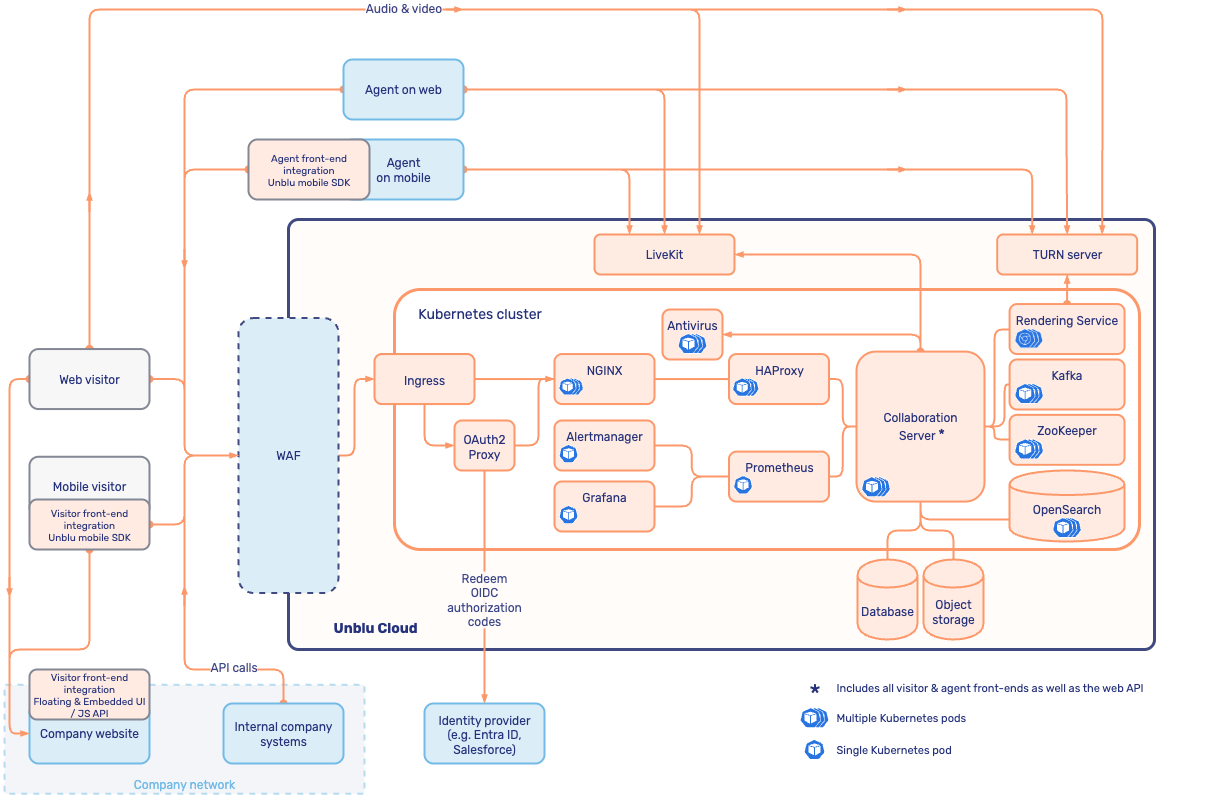
The following diagram gives an overview of the organization of an Unblu Cloud deployment:
Environments
An Unblu Cloud subscription typically includes the following environments:
-
One production account for your live environment.
-
One stage account for pre-production use such as development, integration testing, or user acceptance testing (UAT). Additional non-production accounts can be provisioned on request.
Stage environments must not contain any personally identifiable information (PII). Unblu staff may access them for operational purposes.
The domain assigned to your environments depends on the operating model you choose:
-
In a shared deployment, your account runs on a shared Unblu Collaboration Server with a regional domain such as
eu.unblu.app,us.unblu.app, orca.unblu.app. -
In a dedicated deployment, your account runs on a dedicated Unblu Collaboration Server with its own subdomain of
unblu.app. -
Stage environments typically use a domain in the format
<customer>.<region>.unblu.app.
For more information on operating models, refer to Unblu Cloud operating models.
Integrations
With the Unblu Cloud there is, of course, no server installation or configuration to be done on your end. However, you still need to do some integration work to enable Unblu for visitors on your website. Optionally, you may also want to enable other integrations for visitors, agents, or on the back end.
The primary difference, in terms of integration, between an on-premises installation and the Unblu Cloud setup is how the Floating Visitor UI is integrated. All other integrations and interfaces are the same.
Floating Visitor UI integration
The simplest way to integrate the Floating Visitor UI with the Unblu Cloud is to use static snippet injection with a cross-origin server setup. In this setup, you add the Unblu JavaScript snippet directly to your website, and the visitor’s browser communicates with the Unblu Cloud server.
| The site-embedded server setup isn’t supported with the Unblu Cloud. |
If you use a web application firewall (WAF) such as Airlock Gateway in a hybrid setup, the SecureFlow Manager is also available. This enables dynamic injection of the client-side code and protected resource upload. For details on configuring a hybrid setup with Airlock, refer to Configuring Airlock Gateway for the Unblu Cloud.
For more information on integration options, refer to Floating Visitor UI integration.
Other interfaces and integrations
All other interfaces and integrations work just as they do in an on-premises setup.
-
On the visitor side, the JavaScript APIs, Visitor mobile SDK, and External Messenger API are fully supported.
-
On the agent side, the Agent Desk and Configuration Interface are available out-of-the-box as usual, and the Agent mobile SDK is supported.
-
On the back end, the Unblu web API, webhooks, and bot API are also fully supported.
Single sign-on
The Unblu Cloud supports single sign-on (SSO) for both agents and visitors. You can choose to implement single sign-on for agents, or for visitors, or for both.
For the technical details of SSO in the Unblu Cloud, refer to Single sign-on in the Unblu Cloud.
Custom subdomain
Some Unblu Cloud features, such as visitor SSO, require Unblu to run on the same second-level domain as your host application. To support this, Unblu configures a dedicated subdomain of your domain, such as https://unblu.yourcompany.com, in the Unblu Cloud. For the subdomain to work, you must create a CNAME record pointing to the cloud instance your Unblu installation is running on.
unblu.yourcompany.com.      CNAME yourcompany.unblu.app.
unblu-test.yourcompany.com. CNAME yourcompany.ustage.app.| These records are examples. The exact CNAME targets are provided to you as part of the Unblu Cloud onboarding. |
Certificate management
For custom subdomains, Unblu handles TLS certificate management. Unblu uses certificates issued by Google Trust Services or Let’s Encrypt and automatically rotates the certificates at regular intervals (after at most 90 days).
If your domain restricts certificate issuance with CAA records, you must add a CAA record to your DNS server that authorizes Google Trust Services and Let’s Encrypt to issue certificates for your organization’s subdomain in the Unblu Cloud. Otherwise, the certificates can’t be issued. You can set the CAA record either on the subdomain itself or on your top-level domain. A CAA record on the top-level domain applies to all its subdomains, unless a subdomain has its own CAA record that overrides it.
unblu.yourcompany.com. CAA issue "pki.goog"
unblu.yourcompany.com. CAA issue "letsencrypt.org"
If this approach isn’t possible for you, contact your Unblu account manager.
Service levels
The Unblu Cloud offers the following service levels for production environments:
-
Service level agreement (SLA): 99.75% uptime
-
Service level objective (SLO): 99.95% uptime
Both exclude planned regular maintenance windows.
Stage environments don’t have an SLA.
Maintenance on stage environments may occur during business hours without prior announcement.
See also
-
For general information on deployment options, refer to Deployment models.
-
For more information on configuring your Unblu Cloud account, refer to Unblu Cloud admin application.
-
For information on visitor single sign-on (SSO) in the Unblu Cloud, refer to Single sign-on in the Unblu Cloud.
-
For information on using Airlock Gateway with the Unblu Cloud, refer to Configuring Airlock Gateway for the Unblu Cloud.