Introduction to Aria
This is a preview feature. It may be subject to change or removal with no further notice.
To enable preview features, set com.unblu.platform.enablePreview to true.
For more information on preview features, refer to the Unblu release policy.
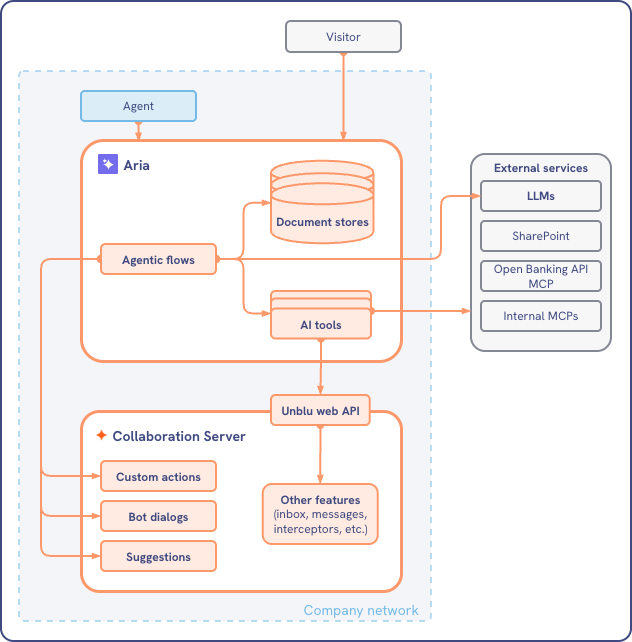
Aria is the central hub for all AI-enabled features in Unblu Spark: Dialog bots, chat suggestions, conversation summaries, and more. It combines the power of Unblu’s conversational environment and large language models (LLMs) with your organization’s internal data.
The diagram below shows how Aria fits into your organization’s setup:
Some Aria features require a separate license. For more information, contact your Unblu account manager.
Configuration
Most of the configuration of Aria takes place in the Aria interface, for example, by defining flows. There are however, some configuration properties you need to set according to your organization’s requirements:
-
To use all the features Aria has to offer, you need a license for the feature. The license can be enabled in the
ACCOUNTorGLOBALscope with the configuration property com.unblu.license.account.featureAria.
-
To enable the Aria menu item in the Agent Desk user menu, set com.unblu.ui.usermenu.showAria to
true.If you don’t enable this property, users with the necessary permissions can still access the Aria interface from the Account Configuration interface.
-
To customize the Aria icon, upload an SVG to the configuration property com.unblu.theme.icons.ariaSymbol. The SVG must be a "symbol" element with its
idset tox-unblu-icon-aria.This option is only available if your organization has a license for the Enterprise UX Kit. -
com.unblu.aria.dialogbot.maxTypingIndicatorTime: This is how long Unblu displays the typing indicator for Aria dialog bots.
See also
-
For information on the Aria interface, refer to the Aria interface guide.
-
For information on customizing the Aria interface logos and favicon, refer to the Aria brand resources in Branding.